

.png&filePath=UPLOAD_MENU_IMG_PATH&pathType=&oldPath=)
.png&filePath=UPLOAD_MENU_IMG_PATH&pathType=&oldPath=)
.png&filePath=UPLOAD_MENU_IMG_PATH&pathType=&oldPath=)
''Search results for
FAQ (Search Results 304 Cases)
-
-
- SNH-C6417BN
- FAQ for SmartCloud Service Discontinuation (Changes to Terms of Use)
-
1. Why is my SmartCloud service being discontinued?
- Due to the below-average usage and the required maintenance to support the service, we will discontinue our SmartCam Cloud as of July 1, 2020. After this date, please use an SD card for accessing your camera video footage. For doorbell users, you can utilize Google Drive for accessing select videos.
- A new firmware and SmartCam + app release will be available at the end of June. Once you update the firmware and app, the camera will stop uploading videos, and you will no longer have access to your data in the app. You will need to backup all of your data before the firmware and app update.
2. What happens if I don’t update to the latest firmware and app?
- If you are a D1 doorbell user, you will not be able to save your recordings. By updating to the latest firmware and app, you can save Human Detection and Abnormal Sound Detection events onto your Google Drive account.
- If you are a SmartCam camera user, upon the expiration of your monthly subscription, you must select the “SD” option. Leaving it on Cloud recording mode will not save your videos. The latest firmware and app will remove the cloud option, which alleviates the need to switch over to the “SD” option.
3. What should I do if I forgot to back up my data after I updated the firmware and app? How can I retrieve my data?
- If you do perform an update on the camera and app before backing up your data, you can still access the prior recordings before the update via mysmartcamcloud.com on your computer.
4. How long do I have to back-up my data from mysmartcamcloud.com?
- You will have access to your data until your retention period ends. For example, if you have the Starter Plan for D1 Doorbell, you will have 30 days from when your subscription expires. However, we strongly encourage you to back-up your data as early as possible.
5. I am not subscribed to a SmartCloud service (event videos stored on the cloud) plan. How will this affect me?
- If you are not a SmartCloud subscriber, there is no need to worry. You will continue to get your notifications and control the camera using the SmartCam+ app.
6. Which models are affected?
- The following models affected by this SmartCloud service are:
• SNH-V6435DN (SmartCam D1 Video Doorbell)
• SNH-P6415BN (SmartCam N1 camera)
• SNH-P6416BN (SmartCam N2 camera)
• SNH-V6431BN
• SNH-V6414BN (SmartCam HD Plus camera)
• SNH-C6417BN
7. What features are affected?
- For the models listed above, the optional SmartCloud service is disabled. SmartCloud subscribers will no longer be able to store videos in the cloud. All other feature, live monitoring, push notification, email alerts and microSD recording will continue to work as usual.
8. When will my SmartCloud subscription be discontinued?
- All SmartCloud service will be permanently discontinued effective July 1, 2020, 12:00 AM. (Eastern Standard Time).
- As of June 1, 2020, we will discontinue renewing monthly subscriptions. For subscriptions prior to June 1, 2020, upon the expiration date of the monthly subscription, monthly subscription customers will not be able to access their SmartCloud account or retrieve any recordings or data. We strongly recommend monthly subscription customers to back up and secure their recordings and data before downloading the new camera firmware and SmartCam + app update.
9. Does this affect the All-In-One security system (Wisenet Life) cloud service too?
- The Wisenet Life Cloud service for DVR and NVR Kits are not affected.
10. Which apps are affected?
- After the camera firmware and SmartCam + app update, you will not be able to retrieve any recordings or data on the SmartCam + app. The update will also affect the SmartCloud app.
11. How can I back-up my recordings from the cloud?
- There are two ways you can download your cloud events.
1) You can access your cloud recordings on the computer by signing into your cloud account at www.mysmartcamcloud.com and select the event that you wish to download. Press the
 icon and it will start downloading the clip.
 2) To download your events on your phone, open your SmartCam+ app and make sure the toggle button is set to Cloud. Select the event you wish to download and press the
 icon on the top right corner and it will start downloading onto your phone.
 3) Once download completed, the “Video file has been downloaded successfully” message will be pop up.
4) If you are also using a microSD card there is no need to back-up your recordings since your cloud events are also saved onto the microSD card.
12. When should I backup my videos from the cloud?
- We recommend downloading your videos before you update to the latest camera firmware and SmartCam + app. Since the updates will disable the uploads to the cloud, no video recordings will be available on the SmartCam + app. The videos taken before the update can still be retrieved by logging into mysmartcamcloud.com via your computer.
13. How can I store my recordings after the service termination?
- For Smart Home camera users, you can use a microSD card (max. 128 GB) to record your events into a local storage.
- For D1 video doorbell users, set up the Google Drive connection to the app to record videos for Human Detection and Abnormal Sound detection.
14. (For doorbell user) How can I connect my account to Google Drive?
- Enable “Notification” under the doorbell’s setting. Enter the Google account info, toggle to enable Google Drive, and then proceed to the authentication process.
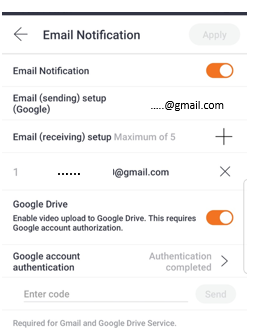
- You can find your videos in the Google Drive app under the "Doorbell_[serial #]" folder. Each video is time-stamped with when the event occurred.
* This new App will be available by end of June.15. When will the cloud service be back up, or will you be offering an alternative service?
- Unfortunately, we do not have any future plans on bringing back SmartCloud. In the meanwhile, please use your microSD card (or Google Drive for D1 video doorbell users) to store and access your events.
If you need additional assistance with this, please reach out to our customer service at 844-WISENET (947-3638) (Mon-Fri: 9:00 AM-5:00 PM EST) or cloud@wisenetlife.com.
-
-
-
- SNH-V6414BN
- FAQ for SmartCloud Service Discontinuation (Changes to Terms of Use)
-
1. Why is my SmartCloud service being discontinued?
- Due to the below-average usage and the required maintenance to support the service, we will discontinue our SmartCam Cloud as of July 1, 2020. After this date, please use an SD card for accessing your camera video footage. For doorbell users, you can utilize Google Drive for accessing select videos.
- A new firmware and SmartCam + app release will be available at the end of June. Once you update the firmware and app, the camera will stop uploading videos, and you will no longer have access to your data in the app. You will need to backup all of your data before the firmware and app update.
2. What happens if I don’t update to the latest firmware and app?
- If you are a D1 doorbell user, you will not be able to save your recordings. By updating to the latest firmware and app, you can save Human Detection and Abnormal Sound Detection events onto your Google Drive account.
- If you are a SmartCam camera user, upon the expiration of your monthly subscription, you must select the “SD” option. Leaving it on Cloud recording mode will not save your videos. The latest firmware and app will remove the cloud option, which alleviates the need to switch over to the “SD” option.
3. What should I do if I forgot to back up my data after I updated the firmware and app? How can I retrieve my data?
- If you do perform an update on the camera and app before backing up your data, you can still access the prior recordings before the update via mysmartcamcloud.com on your computer.
4. How long do I have to back-up my data from mysmartcamcloud.com?
- You will have access to your data until your retention period ends. For example, if you have the Starter Plan for D1 Doorbell, you will have 30 days from when your subscription expires. However, we strongly encourage you to back-up your data as early as possible.
5. I am not subscribed to a SmartCloud service (event videos stored on the cloud) plan. How will this affect me?
- If you are not a SmartCloud subscriber, there is no need to worry. You will continue to get your notifications and control the camera using the SmartCam+ app.
6. Which models are affected?
- The following models affected by this SmartCloud service are:
• SNH-V6435DN (SmartCam D1 Video Doorbell)
• SNH-P6415BN (SmartCam N1 camera)
• SNH-P6416BN (SmartCam N2 camera)
• SNH-V6431BN
• SNH-V6414BN (SmartCam HD Plus camera)
• SNH-C6417BN
7. What features are affected?
- For the models listed above, the optional SmartCloud service is disabled. SmartCloud subscribers will no longer be able to store videos in the cloud. All other feature, live monitoring, push notification, email alerts and microSD recording will continue to work as usual.
8. When will my SmartCloud subscription be discontinued?
- All SmartCloud service will be permanently discontinued effective July 1, 2020, 12:00 AM. (Eastern Standard Time).
- As of June 1, 2020, we will discontinue renewing monthly subscriptions. For subscriptions prior to June 1, 2020, upon the expiration date of the monthly subscription, monthly subscription customers will not be able to access their SmartCloud account or retrieve any recordings or data. We strongly recommend monthly subscription customers to back up and secure their recordings and data before downloading the new camera firmware and SmartCam + app update.
9. Does this affect the All-In-One security system (Wisenet Life) cloud service too?
- The Wisenet Life Cloud service for DVR and NVR Kits are not affected.
10. Which apps are affected?
- After the camera firmware and SmartCam + app update, you will not be able to retrieve any recordings or data on the SmartCam + app. The update will also affect the SmartCloud app.
11. How can I back-up my recordings from the cloud?
- There are two ways you can download your cloud events.
1) You can access your cloud recordings on the computer by signing into your cloud account at www.mysmartcamcloud.com and select the event that you wish to download. Press the
icon and it will start downloading the clip. 2) To download your events on your phone, open your SmartCam+ app and make sure the toggle button is set to Cloud. Select the event you wish to download and press the
icon on the top right corner and it will start downloading onto your phone. 3) Once download completed, the “Video file has been downloaded successfully” message will be pop up.
4) If you are also using a microSD card there is no need to back-up your recordings since your cloud events are also saved onto the microSD card.
12. When should I backup my videos from the cloud?
- We recommend downloading your videos before you update to the latest camera firmware and SmartCam + app. Since the updates will disable the uploads to the cloud, no video recordings will be available on the SmartCam + app. The videos taken before the update can still be retrieved by logging into mysmartcamcloud.com via your computer.
13. How can I store my recordings after the service termination?
- For Smart Home camera users, you can use a microSD card (max. 128 GB) to record your events into a local storage.
- For D1 video doorbell users, set up the Google Drive connection to the app to record videos for Human Detection and Abnormal Sound detection.
14. (For doorbell user) How can I connect my account to Google Drive?
- Enable “Notification” under the doorbell’s setting. Enter the Google account info, toggle to enable Google Drive, and then proceed to the authentication process.
- You can find your videos in the Google Drive app under the "Doorbell_[serial #]" folder. Each video is time-stamped with when the event occurred.
* This new App will be available by end of June.15. When will the cloud service be back up, or will you be offering an alternative service?
- Unfortunately, we do not have any future plans on bringing back SmartCloud. In the meanwhile, please use your microSD card (or Google Drive for D1 video doorbell users) to store and access your events.
If you need additional assistance with this, please reach out to our customer service at 844-WISENET (947-3638) (Mon-Fri: 9:00 AM-5:00 PM EST) or cloud@wisenetlife.com.
-
-
-
- SNH-V6431BN
- FAQ for SmartCloud Service Discontinuation (Changes to Terms of Use)
-
1. Why is my SmartCloud service being discontinued?
- Due to the below-average usage and the required maintenance to support the service, we will discontinue our SmartCam Cloud as of July 1, 2020. After this date, please use an SD card for accessing your camera video footage. For doorbell users, you can utilize Google Drive for accessing select videos.
- A new firmware and SmartCam + app release will be available at the end of June. Once you update the firmware and app, the camera will stop uploading videos, and you will no longer have access to your data in the app. You will need to backup all of your data before the firmware and app update.
2. What happens if I don’t update to the latest firmware and app?
- If you are a D1 doorbell user, you will not be able to save your recordings. By updating to the latest firmware and app, you can save Human Detection and Abnormal Sound Detection events onto your Google Drive account.
- If you are a SmartCam camera user, upon the expiration of your monthly subscription, you must select the “SD” option. Leaving it on Cloud recording mode will not save your videos. The latest firmware and app will remove the cloud option, which alleviates the need to switch over to the “SD” option.
3. What should I do if I forgot to back up my data after I updated the firmware and app? How can I retrieve my data?
- If you do perform an update on the camera and app before backing up your data, you can still access the prior recordings before the update via mysmartcamcloud.com on your computer.
4. How long do I have to back-up my data from mysmartcamcloud.com?
- You will have access to your data until your retention period ends. For example, if you have the Starter Plan for D1 Doorbell, you will have 30 days from when your subscription expires. However, we strongly encourage you to back-up your data as early as possible.
5. I am not subscribed to a SmartCloud service (event videos stored on the cloud) plan. How will this affect me?
- If you are not a SmartCloud subscriber, there is no need to worry. You will continue to get your notifications and control the camera using the SmartCam+ app.
6. Which models are affected?
- The following models affected by this SmartCloud service are:
• SNH-V6435DN (SmartCam D1 Video Doorbell)
• SNH-P6415BN (SmartCam N1 camera)
• SNH-P6416BN (SmartCam N2 camera)
• SNH-V6431BN
• SNH-V6414BN (SmartCam HD Plus camera)
• SNH-C6417BN
7. What features are affected?
- For the models listed above, the optional SmartCloud service is disabled. SmartCloud subscribers will no longer be able to store videos in the cloud. All other feature, live monitoring, push notification, email alerts and microSD recording will continue to work as usual.
8. When will my SmartCloud subscription be discontinued?
- All SmartCloud service will be permanently discontinued effective July 1, 2020, 12:00 AM. (Eastern Standard Time).
- As of June 1, 2020, we will discontinue renewing monthly subscriptions. For subscriptions prior to June 1, 2020, upon the expiration date of the monthly subscription, monthly subscription customers will not be able to access their SmartCloud account or retrieve any recordings or data. We strongly recommend monthly subscription customers to back up and secure their recordings and data before downloading the new camera firmware and SmartCam + app update.
9. Does this affect the All-In-One security system (Wisenet Life) cloud service too?
- The Wisenet Life Cloud service for DVR and NVR Kits are not affected.
10. Which apps are affected?
- After the camera firmware and SmartCam + app update, you will not be able to retrieve any recordings or data on the SmartCam + app. The update will also affect the SmartCloud app.
11. How can I back-up my recordings from the cloud?
- There are two ways you can download your cloud events.
1) You can access your cloud recordings on the computer by signing into your cloud account at www.mysmartcamcloud.com and select the event that you wish to download. Press the
icon and it will start downloading the clip. 2) To download your events on your phone, open your SmartCam+ app and make sure the toggle button is set to Cloud. Select the event you wish to download and press the
icon on the top right corner and it will start downloading onto your phone. 3) Once download completed, the “Video file has been downloaded successfully” message will be pop up.
4) If you are also using a microSD card there is no need to back-up your recordings since your cloud events are also saved onto the microSD card.
12. When should I backup my videos from the cloud?
- We recommend downloading your videos before you update to the latest camera firmware and SmartCam + app. Since the updates will disable the uploads to the cloud, no video recordings will be available on the SmartCam + app. The videos taken before the update can still be retrieved by logging into mysmartcamcloud.com via your computer.
13. How can I store my recordings after the service termination?
- For Smart Home camera users, you can use a microSD card (max. 128 GB) to record your events into a local storage.
- For D1 video doorbell users, set up the Google Drive connection to the app to record videos for Human Detection and Abnormal Sound detection.
14. (For doorbell user) How can I connect my account to Google Drive?
- Enable “Notification” under the doorbell’s setting. Enter the Google account info, toggle to enable Google Drive, and then proceed to the authentication process.
- You can find your videos in the Google Drive app under the "Doorbell_[serial #]" folder. Each video is time-stamped with when the event occurred.
* This new App will be available by end of June.15. When will the cloud service be back up, or will you be offering an alternative service?
- Unfortunately, we do not have any future plans on bringing back SmartCloud. In the meanwhile, please use your microSD card (or Google Drive for D1 video doorbell users) to store and access your events.
If you need additional assistance with this, please reach out to our customer service at 844-WISENET (947-3638) (Mon-Fri: 9:00 AM-5:00 PM EST) or cloud@wisenetlife.com.
-
-
-
- SNH-P6416BN
- FAQ for SmartCloud Service Discontinuation (Changes to Terms of Use)
-
1. Why is my SmartCloud service being discontinued?
- Due to the below-average usage and the required maintenance to support the service, we will discontinue our SmartCam Cloud as of July 1, 2020. After this date, please use an SD card for accessing your camera video footage. For doorbell users, you can utilize Google Drive for accessing select videos.
- A new firmware and SmartCam + app release will be available at the end of June. Once you update the firmware and app, the camera will stop uploading videos, and you will no longer have access to your data in the app. You will need to backup all of your data before the firmware and app update.
2. What happens if I don’t update to the latest firmware and app?
- If you are a D1 doorbell user, you will not be able to save your recordings. By updating to the latest firmware and app, you can save Human Detection and Abnormal Sound Detection events onto your Google Drive account.
- If you are a SmartCam camera user, upon the expiration of your monthly subscription, you must select the “SD” option. Leaving it on Cloud recording mode will not save your videos. The latest firmware and app will remove the cloud option, which alleviates the need to switch over to the “SD” option.
3. What should I do if I forgot to back up my data after I updated the firmware and app? How can I retrieve my data?
- If you do perform an update on the camera and app before backing up your data, you can still access the prior recordings before the update via mysmartcamcloud.com on your computer.
4. How long do I have to back-up my data from mysmartcamcloud.com?
- You will have access to your data until your retention period ends. For example, if you have the Starter Plan for D1 Doorbell, you will have 30 days from when your subscription expires. However, we strongly encourage you to back-up your data as early as possible.
5. I am not subscribed to a SmartCloud service (event videos stored on the cloud) plan. How will this affect me?
- If you are not a SmartCloud subscriber, there is no need to worry. You will continue to get your notifications and control the camera using the SmartCam+ app.
6. Which models are affected?
- The following models affected by this SmartCloud service are:
• SNH-V6435DN (SmartCam D1 Video Doorbell)
• SNH-P6415BN (SmartCam N1 camera)
• SNH-P6416BN (SmartCam N2 camera)
• SNH-V6431BN
• SNH-V6414BN (SmartCam HD Plus camera)
• SNH-C6417BN
7. What features are affected?
- For the models listed above, the optional SmartCloud service is disabled. SmartCloud subscribers will no longer be able to store videos in the cloud. All other feature, live monitoring, push notification, email alerts and microSD recording will continue to work as usual.
8. When will my SmartCloud subscription be discontinued?
- All SmartCloud service will be permanently discontinued effective July 1, 2020, 12:00 AM. (Eastern Standard Time).
- As of June 1, 2020, we will discontinue renewing monthly subscriptions. For subscriptions prior to June 1, 2020, upon the expiration date of the monthly subscription, monthly subscription customers will not be able to access their SmartCloud account or retrieve any recordings or data. We strongly recommend monthly subscription customers to back up and secure their recordings and data before downloading the new camera firmware and SmartCam + app update.
9. Does this affect the All-In-One security system (Wisenet Life) cloud service too?
- The Wisenet Life Cloud service for DVR and NVR Kits are not affected.
10. Which apps are affected?
- After the camera firmware and SmartCam + app update, you will not be able to retrieve any recordings or data on the SmartCam + app. The update will also affect the SmartCloud app.
11. How can I back-up my recordings from the cloud?
- There are two ways you can download your cloud events.
1) You can access your cloud recordings on the computer by signing into your cloud account at www.mysmartcamcloud.com and select the event that you wish to download. Press the
icon and it will start downloading the clip. 2) To download your events on your phone, open your SmartCam+ app and make sure the toggle button is set to Cloud. Select the event you wish to download and press the
icon on the top right corner and it will start downloading onto your phone. 3) Once download completed, the “Video file has been downloaded successfully” message will be pop up.
4) If you are also using a microSD card there is no need to back-up your recordings since your cloud events are also saved onto the microSD card.
12. When should I backup my videos from the cloud?
- We recommend downloading your videos before you update to the latest camera firmware and SmartCam + app. Since the updates will disable the uploads to the cloud, no video recordings will be available on the SmartCam + app. The videos taken before the update can still be retrieved by logging into mysmartcamcloud.com via your computer.
13. How can I store my recordings after the service termination?
- For Smart Home camera users, you can use a microSD card (max. 128 GB) to record your events into a local storage.
- For D1 video doorbell users, set up the Google Drive connection to the app to record videos for Human Detection and Abnormal Sound detection.
14. (For doorbell user) How can I connect my account to Google Drive?
- Enable “Notification” under the doorbell’s setting. Enter the Google account info, toggle to enable Google Drive, and then proceed to the authentication process.
- You can find your videos in the Google Drive app under the "Doorbell_[serial #]" folder. Each video is time-stamped with when the event occurred.
* This new App will be available by end of June.15. When will the cloud service be back up, or will you be offering an alternative service?
- Unfortunately, we do not have any future plans on bringing back SmartCloud. In the meanwhile, please use your microSD card (or Google Drive for D1 video doorbell users) to store and access your events.
If you need additional assistance with this, please reach out to our customer service at 844-WISENET (947-3638) (Mon-Fri: 9:00 AM-5:00 PM EST) or cloud@wisenetlife.com.
-
-
-
- SNH-P6415BN
- FAQ for SmartCloud Service Discontinuation (Changes to Terms of Use)
-
1. Why is my SmartCloud service being discontinued?
- Due to the below-average usage and the required maintenance to support the service, we will discontinue our SmartCam Cloud as of July 1, 2020. After this date, please use an SD card for accessing your camera video footage. For doorbell users, you can utilize Google Drive for accessing select videos.
- A new firmware and SmartCam + app release will be available at the end of June. Once you update the firmware and app, the camera will stop uploading videos, and you will no longer have access to your data in the app. You will need to backup all of your data before the firmware and app update.
2. What happens if I don’t update to the latest firmware and app?
- If you are a D1 doorbell user, you will not be able to save your recordings. By updating to the latest firmware and app, you can save Human Detection and Abnormal Sound Detection events onto your Google Drive account.
- If you are a SmartCam camera user, upon the expiration of your monthly subscription, you must select the “SD” option. Leaving it on Cloud recording mode will not save your videos. The latest firmware and app will remove the cloud option, which alleviates the need to switch over to the “SD” option.
3. What should I do if I forgot to back up my data after I updated the firmware and app? How can I retrieve my data?
- If you do perform an update on the camera and app before backing up your data, you can still access the prior recordings before the update via mysmartcamcloud.com on your computer.
4. How long do I have to back-up my data from mysmartcamcloud.com?
- You will have access to your data until your retention period ends. For example, if you have the Starter Plan for D1 Doorbell, you will have 30 days from when your subscription expires. However, we strongly encourage you to back-up your data as early as possible.
5. I am not subscribed to a SmartCloud service (event videos stored on the cloud) plan. How will this affect me?
- If you are not a SmartCloud subscriber, there is no need to worry. You will continue to get your notifications and control the camera using the SmartCam+ app.
6. Which models are affected?
- The following models affected by this SmartCloud service are:
• SNH-V6435DN (SmartCam D1 Video Doorbell)
• SNH-P6415BN (SmartCam N1 camera)
• SNH-P6416BN (SmartCam N2 camera)
• SNH-V6431BN
• SNH-V6414BN (SmartCam HD Plus camera)
• SNH-C6417BN
7. What features are affected?
- For the models listed above, the optional SmartCloud service is disabled. SmartCloud subscribers will no longer be able to store videos in the cloud. All other feature, live monitoring, push notification, email alerts and microSD recording will continue to work as usual.
8. When will my SmartCloud subscription be discontinued?
- All SmartCloud service will be permanently discontinued effective July 1, 2020, 12:00 AM. (Eastern Standard Time).
- As of June 1, 2020, we will discontinue renewing monthly subscriptions. For subscriptions prior to June 1, 2020, upon the expiration date of the monthly subscription, monthly subscription customers will not be able to access their SmartCloud account or retrieve any recordings or data. We strongly recommend monthly subscription customers to back up and secure their recordings and data before downloading the new camera firmware and SmartCam + app update.
9. Does this affect the All-In-One security system (Wisenet Life) cloud service too?
- The Wisenet Life Cloud service for DVR and NVR Kits are not affected.
10. Which apps are affected?
- After the camera firmware and SmartCam + app update, you will not be able to retrieve any recordings or data on the SmartCam + app. The update will also affect the SmartCloud app.
11. How can I back-up my recordings from the cloud?
- There are two ways you can download your cloud events.
1) You can access your cloud recordings on the computer by signing into your cloud account at www.mysmartcamcloud.com and select the event that you wish to download. Press the
icon and it will start downloading the clip. 2) To download your events on your phone, open your SmartCam+ app and make sure the toggle button is set to Cloud. Select the event you wish to download and press the
icon on the top right corner and it will start downloading onto your phone. 3) Once download completed, the “Video file has been downloaded successfully” message will be pop up.
4) If you are also using a microSD card there is no need to back-up your recordings since your cloud events are also saved onto the microSD card.
12. When should I backup my videos from the cloud?
- We recommend downloading your videos before you update to the latest camera firmware and SmartCam + app. Since the updates will disable the uploads to the cloud, no video recordings will be available on the SmartCam + app. The videos taken before the update can still be retrieved by logging into mysmartcamcloud.com via your computer.
13. How can I store my recordings after the service termination?
- For Smart Home camera users, you can use a microSD card (max. 128 GB) to record your events into a local storage.
- For D1 video doorbell users, set up the Google Drive connection to the app to record videos for Human Detection and Abnormal Sound detection.
14. (For doorbell user) How can I connect my account to Google Drive?
- Enable “Notification” under the doorbell’s setting. Enter the Google account info, toggle to enable Google Drive, and then proceed to the authentication process.
- You can find your videos in the Google Drive app under the "Doorbell_[serial #]" folder. Each video is time-stamped with when the event occurred.
* This new App will be available by end of June.15. When will the cloud service be back up, or will you be offering an alternative service?
- Unfortunately, we do not have any future plans on bringing back SmartCloud. In the meanwhile, please use your microSD card (or Google Drive for D1 video doorbell users) to store and access your events.
If you need additional assistance with this, please reach out to our customer service at 844-WISENET (947-3638) (Mon-Fri: 9:00 AM-5:00 PM EST) or cloud@wisenetlife.com.
-
-
-
- SNH-V6435DN
- FAQ for SmartCloud Service Discontinuation (Changes to Terms of Use)
-
1. Why is my SmartCloud service being discontinued?
- Due to the below-average usage and the required maintenance to support the service, we will discontinue our SmartCam Cloud as of July 1, 2020. After this date, please use an SD card for accessing your camera video footage. For doorbell users, you can utilize Google Drive for accessing select videos.
- A new firmware and SmartCam + app release will be available at the end of June. Once you update the firmware and app, the camera will stop uploading videos, and you will no longer have access to your data in the app. You will need to backup all of your data before the firmware and app update.
2. What happens if I don’t update to the latest firmware and app?
- If you are a D1 doorbell user, you will not be able to save your recordings. By updating to the latest firmware and app, you can save Human Detection and Abnormal Sound Detection events onto your Google Drive account.
- If you are a SmartCam camera user, upon the expiration of your monthly subscription, you must select the “SD” option. Leaving it on Cloud recording mode will not save your videos. The latest firmware and app will remove the cloud option, which alleviates the need to switch over to the “SD” option.
3. What should I do if I forgot to back up my data after I updated the firmware and app? How can I retrieve my data?
- If you do perform an update on the camera and app before backing up your data, you can still access the prior recordings before the update via mysmartcamcloud.com on your computer.
4. How long do I have to back-up my data from mysmartcamcloud.com?
- You will have access to your data until your retention period ends. For example, if you have the Starter Plan for D1 Doorbell, you will have 30 days from when your subscription expires. However, we strongly encourage you to back-up your data as early as possible.
5. I am not subscribed to a SmartCloud service (event videos stored on the cloud) plan. How will this affect me?
- If you are not a SmartCloud subscriber, there is no need to worry. You will continue to get your notifications and control the camera using the SmartCam+ app.
6. Which models are affected?
- The following models affected by this SmartCloud service are:
• SNH-V6435DN (SmartCam D1 Video Doorbell)
• SNH-P6415BN (SmartCam N1 camera)
• SNH-P6416BN (SmartCam N2 camera)
• SNH-V6431BN
• SNH-V6414BN (SmartCam HD Plus camera)
• SNH-C6417BN
7. What features are affected?
- For the models listed above, the optional SmartCloud service is disabled. SmartCloud subscribers will no longer be able to store videos in the cloud. All other feature, live monitoring, push notification, email alerts and microSD recording will continue to work as usual.
8. When will my SmartCloud subscription be discontinued?
- All SmartCloud service will be permanently discontinued effective July 1, 2020, 12:00 AM. (Eastern Standard Time).
- As of June 1, 2020, we will discontinue renewing monthly subscriptions. For subscriptions prior to June 1, 2020, upon the expiration date of the monthly subscription, monthly subscription customers will not be able to access their SmartCloud account or retrieve any recordings or data. We strongly recommend monthly subscription customers to back up and secure their recordings and data before downloading the new camera firmware and SmartCam + app update.
9. Does this affect the All-In-One security system (Wisenet Life) cloud service too?
- The Wisenet Life Cloud service for DVR and NVR Kits are not affected.
10. Which apps are affected?
- After the camera firmware and SmartCam + app update, you will not be able to retrieve any recordings or data on the SmartCam + app. The update will also affect the SmartCloud app.
11. How can I back-up my recordings from the cloud?
- There are two ways you can download your cloud events.
1) You can access your cloud recordings on the computer by signing into your cloud account at www.mysmartcamcloud.com and select the event that you wish to download. Press the
icon and it will start downloading the clip. 2) To download your events on your phone, open your SmartCam+ app and make sure the toggle button is set to Cloud. Select the event you wish to download and press the
icon on the top right corner and it will start downloading onto your phone. 3) Once download completed, the “Video file has been downloaded successfully” message will be pop up.
4) If you are also using a microSD card there is no need to back-up your recordings since your cloud events are also saved onto the microSD card.
12. When should I backup my videos from the cloud?
- We recommend downloading your videos before you update to the latest camera firmware and SmartCam + app. Since the updates will disable the uploads to the cloud, no video recordings will be available on the SmartCam + app. The videos taken before the update can still be retrieved by logging into mysmartcamcloud.com via your computer.
13. How can I store my recordings after the service termination?
- For Smart Home camera users, you can use a microSD card (max. 128 GB) to record your events into a local storage.
- For D1 video doorbell users, set up the Google Drive connection to the app to record videos for Human Detection and Abnormal Sound detection.
14. (For doorbell user) How can I connect my account to Google Drive?
- Enable “Notification” under the doorbell’s setting. Enter the Google account info, toggle to enable Google Drive, and then proceed to the authentication process.
- You can find your videos in the Google Drive app under the "Doorbell_[serial #]" folder. Each video is time-stamped with when the event occurred.
* This new App will be available by end of June.15. When will the cloud service be back up, or will you be offering an alternative service?
- Unfortunately, we do not have any future plans on bringing back SmartCloud. In the meanwhile, please use your microSD card (or Google Drive for D1 video doorbell users) to store and access your events.
If you need additional assistance with this, please reach out to our customer service at 844-WISENET (947-3638) (Mon-Fri: 9:00 AM-5:00 PM EST) or cloud@wisenetlife.com.
-
-
-
- SNH-V6435DN
- [Troubleshooting] [ETC] I am unable to view/playback video recordings.
-
Reasons for not being able to view/playback video recordings:
1. Check to see if your free 15-day cloud trial has expired. If your cloud trial has expired, then please sign up for a monthly cloud service plan so you can view all of your footages again. When the cloud trial expires, you no longer have access to Video Playbacks and Event Recordings.
2. Check to see if your Wi-Fi network and the cloud is synced. If it is not synced, simply reconnect to the cloud by going to your Cloud page and press the “Cloud Connection” button.
• Navigation steps: Log into the app -> Click the 3 bars on top left corner (User settings page) -> Click the cloud icon (My Plan) -> Locate the “Cloud Connection” button and press it to sync.
-
-
-
- SNH-V6435DN
- [General] Do I have to pay a monthly fee to use the SmartCam D1?
-
No, you can still use the features listed below without a SmartCloud Plan.
In-App Features (No SmartCloud Subscription needed)
- Push Notifications
- Human Detection
- Motion Zone Select
- Abnormal Sound Detection
- Live Feed On-Demand
- Two-Way Talk
-
-
-
- SNH-V6435DN
- [Troubleshooting] [Registration] I am unable to register my SmartCam D1 on the SmartCam+app.
-
1. Check the Wi-Fi signal. If it is weak, it’s because the camera is too far from the router.
- You can check the Wi-Fi signal strength in SmartCam+ App
2. Check if the serial number (Last 4 digits) of your camera is listed. Smartcam_XXXX
3. Check if your router password is correct.
4. Initialize your camera to factory settings and register again.
- Push the reset button on the camera front for 5 sec.
- Camera will be in default mode after rebooting (Status LED will blink red)
- Push '+' button on the Smartcam+ app, and follow the registration guide provided in the app.
-
-
-
- SNH-C6417BN
- The camera used in the office does not work in my home.
-
1. As the network information of the office router is saved in the camera, you will need to register the camera again to use it in your home.
2. However, if the camera is turned off and relocated in the same place, the camera will automatically connect to the existing router.
-
Terms of Use
닫기These Terms of Service, together with our Privacy Notice, which is incorporated herein by reference, all applicable terms in the Documentation, and other terms that we may provide as applicable, for instance, “Special Terms” as defined below, (collectively, these Terms of Service, the Privacy Notice, terms from the Documentation and any Special Terms are referred to as the “Terms” or “Agreement”) govern your access to and use of the Services and Products. Please read all of the Terms carefully. By using the Services and Products, you agree to be bound by all of the Terms.
The term “you” in these Terms refers to any natural person or entity that accesses or uses any of the Services or Products in any fashion whatever, or who creates an Account (as defined below in Section 2) including Account Owners, and Authorized Users as applicable. The terms “us” and “we” refer to Hanwha.
THESE TERMS CONSTITUTE A LEGAL AGREEMENT BETWEEN YOU AND HANWHA. BY ACCEPTING THESE TERMS THROUGH A SITE, WEB APPLICATION OR MOBILE APPLICATION, OR BY ACCESSING AND USING THE SERVICES (INCLUDING THE SITES) OR PRODUCTS, YOU ARE ACCEPTING AND AGREEING TO THESE TERMS, AND ALL OTHER TERMS HANWHA PROVIDES IN THE DOCUMENTATION APPLICABLE TO THE SERVICES AND PRODUCTS USED BY YOU, ON BEHALF OF YOURSELF AND/OR THE ENTITY YOU REPRESENT IN CONNECTION WITH THE ACCESS AND USE. YOU REPRESENT AND WARRANT THAT YOU HAVE THE RIGHT, AUTHORITY, AND CAPACITY TO ACCEPT AND AGREE TO THESE TERMS ON BEHALF OF YOURSELF OR THE ENTITY YOU REPRESENT. YOU REPRESENT THAT YOU ARE OF SUFFICIENT LEGAL AGE IN YOUR JURISDICTION OR RESIDENCE TO USE OR ACCESS THE SERVICES AND PRODUCTS AND TO ENTER INTO THIS AGREEMENT. IF YOU DO NOT AGREE WITH ANY OF THE PROVISIONS CONTAINED IN THESE TERMS, YOU SHOULD CEASE AND DESIST FROM ALL ACCESS AND/OR USE OF THE SERVICES AND PRODUCTS.
THESE TERMS REQUIRE THE USE OF MANDATORY BINDING ARBITRATION TO RESOLVE DISPUTES BETWEEN US REGARDING THE SERVICES AND PRODUCTS, ON AN INDIVIDUAL BASIS. THIS MEANS THAT YOU WILL NOT HAVE, AND ARE WAIVING, YOUR RIGHTS TO SUBMIT DISPUTES TO A COURT OF LAW, TO HAVE A JUDGE OR JURY DECIDE YOUR DISPUTE, AND TO PROCEED IN A CLASS ACTION, OR ON A CONSOLIDATED OR REPRESENTATIVE BASIS.
These Terms provide you with certain legal rights. You may have other legal rights applicable to your access and use of the Services and Products, which rights vary from jurisdiction to jurisdiction. THE DISCLAIMERS, EXCLUSIONS, MANDATORY AND BINDING ARBITRATION, LIMITATIONS OF LIABILITY, INDEMNIFICATION, WAIVER OF JURY TRIAL, WAIVER OF CLASS ACTION AND WAIVER OF PUNITIVE DAMAGES UNDER THESE TERMS WILL NOT APPLY TO THE EXTENT PROHIBITED BY APPLICABLE LAW. Some jurisdictions do not allow the exclusion of implied warranties or the exclusion or limitation of incidental or consequential damages or other rights, so those provisions of these Terms may not apply to you.
1. Applicability, Eligibility, Term
- By clicking the “Accept” or “I Agree” button or check box before or in connection with using the Services, you agree that you have read all applicable Terms.
- You also agree that by accessing or using the Services and Products, you are bound by, and Hanwha will treat you as being bound by, all applicable Terms.
b) Eligibility.
- You may access and use the Services and Products only if you have the legal capacity to enter this Agreement and form a binding contract with Hanwha (except as provided in subsection (iii) below), and you accept this Agreement by clicking the appropriate acceptance mechanism before or in connection with using the Services or by actually using the Services or Products. By doing so you represent and warrant that you have the requisite legal capacity to form such a contract with Hanwha.
- Only individuals age 18 and older are permitted to use and establish Accounts with the Subscription Services. If you establish an Account, you agree that you are 18 years of age or older, and have legal capacity according to your jurisdiction.
- Any use or access to the Services and Products by any person under the age of 13 is strictly prohibited and is a violation of this Agreement.
c) Term, Termination. This Agreement, as it may be updated by Hanwha from time to time at Hanwha’s sole discretion, will remain in full force and effect so long as you continue to access and/or use the Services and Products, or until terminated in accordance with its provisions.
- At any time, Hanwha may, with or without notice suspend or terminate your rights or access to the Services, cancel your subscription to the Service, or terminate this Agreement as to you, without bearing any liability to you, if Hanwha has the good faith belief that you have violated any provision of this Agreement or you have engaged in conduct that Hanwha, in its sole discretion, considers unacceptable. Hanwha may also pursue any other remedy legally available to it for such violations or conduct by you.
- You may cancel your subscription to Subscription Services at any time, with or without cause, by contacting us through your Account or at a link provided by Hanwha at one of the Sites.
- Upon cancellation or termination of your subscription, Your Content (as defined herein) will be available to you through the remaining paid period of your subscriptions, and thereafter will be immediately and irrevocably deleted and removed from the Sites and Hanwha’s servers.
- Upon any termination of this Agreement with respect to you, your Account and your right to access and use the Services shall immediately and automatically terminate.
- In the event of the termination of this Agreement, whether by you or by Hanwha, the provisions of sections 8, 9, 10, 11, 12, 13, and 14 shall survive such termination and remain in full force and effect.
d) Changes to the Terms. Hanwha reserves the right to make changes to the Terms at its sole discretion. Hanwha will post notice of the changes, or the updated Terms, to this webpage, and/or within a Site, Web Application or Mobile Application. Whenever using or accessing the Services or Products, you are responsible to ensure you have read and agreed to the most recent applicable Terms. Continued use and access to the Services and Products after any changes or updates constitutes your acknowledgment and acceptance of such changes and updates and your agreement to be bound by the changed and updated Terms.
2. User Accounts
b) Access control. You agree that you are entirely responsible for maintaining the confidentiality of your Account login information and for all activities that occur under your Account. You agree to use strong passwords with your Account, and to maintain your password securely to prevent others from gaining access without your permission. You acknowledge and agree that it is your responsibility to maintain, protect, and respect the confidentiality of your username and password. You further agree to take reasonable precautions to prevent the unauthorized use of your username and password, including but not limited to periodic changes of your password, and using the logout procedure for the Service as documented in the Documentation. You agree to immediately notify Hanwha of any known or suspected unauthorized use of or access to your Account or any other breach of security. You agree that Hanwha has no liability for any loss or damage, direct, indirect, consequential or otherwise, arising from your failure to comply with the above requirements.
c) Authorized Users. An Owner may authorize other persons, age 18 or older, to access an Owner’s Products and Services. Such other persons are “Authorized Users.” Depending on the authorization granted by an Owner, Authorized Users may have the ability to use the Services and monitor and control the Products. Authorized Users may also have the ability to view information (including personal information) and content across all of an Owner’s Products and Services. Owner hereby agrees to be fully responsible for all actions taken by Authorized Users relating to the Owner’s Products, Services and Account. You should authorize only those individuals that you trust to access your Account, Products, and Services. You agree that Hanwha has no liability for any loss or damage, direct, indirect, consequential or otherwise, arising from the actions of any of your Authorized Users. You acknowledge and agree that it is your sole responsibility to deactivate or delete Authorized Users of your Account when you no longer wish to authorize such individuals to access your Account.
3. Access to and Use of the Services
b) Third-Party licenses. The Services may include third-party applications, which may be subject to the terms and conditions of separate license agreements. Such license agreements will be provided to you in advance of or at the time of your interaction with such third-party applications. You acknowledge and agree that your use of such third-party applications in connection with the Services constitutes your acknowledgement and acceptance of the terms and conditions of all applicable third-party license agreements.
c) Intended Use. The Services are intended to be accessed and used for non-time-critical information and control of the Products. Hanwha endeavors to make the Services highly reliable and available, Hanwha cannot and does not warrant that they will be, nor are they intended to be reliable and available 100% of the time. The Services are subject to sporadic interruptions and failures for a variety of reasons beyond Hanwha’s control, including Wi-Fi intermittency, service provider downtime, mobile notification delays or failures, and cellular carrier interruptions, among others. You acknowledge these limitations and agree that Hanwha is not responsible for any damages allegedly caused by the failure or delay of the Services.
d) No Life-Safety or Critical Use. You acknowledge that our Products and Services are not intended for a third-party monitored emergency notification system and that we do not monitor emergency notifications and will not dispatch emergency authorities to your home in the event of an emergency. Hanwha makes no warranty or representation that use of the Products or Services will affect or increase any level of safety. You acknowledge that the Products and Services are not intended to be 100% reliable and are not a substitute for a third-party monitored emergency notification system. We cannot and do not guarantee that you will receive notifications in any given timeframe or at all. All life threatening, safety and emergency events should be directed to the appropriate response services.
e) Content and User Submissions. The Services may display or provide certain content, including but not limited to documents, logos, text, graphics, images, and audio and video recordings or live multimedia content (collectively, “Content”). Content may be provided or displayed by Hanwha, but also includes recordings and live streams of video and audio from the Products, as well as Content that you and other users provide us in the course of using the Services (collectively, “User Submissions”). You are responsible for all your User Submissions, and you represent and warrant that you have all necessary rights and privileges to do so, in the manner in which you transmit or contribute such Content. You represent and warrant that that you own, have obtained all necessary permissions or licenses, or otherwise control all of the intellectual property rights to your Content, and that use of your User Submissions by your Authorized Users, other users of the Service, and Hanwha will not infringe upon or violate the rights of any third party; and you license to Hanwha all patent, trademark, copyright, trade secret and other intellectual property rights in and to such User Submissions for purposes of publishing and displaying within the Services as Content. You agree that you will abide by all copyright and trademark laws and restrictions applicable to any Content you access through the Services, and that you shall not use, copy, reproduce, modify, translate, publish, broadcast, transmit, distribute, perform, upload, display, license, sell or otherwise exploit for any purposes whatsoever any Content in which you have no proprietary rights: (i) without the express prior written consent of the respective owners, and (ii) in any way that violates any third party right.
f) Facial Recognition feature. The Services may include the provision of facial recognition technologies applied to the video Content generated by your Products. If you choose to utilize this feature, it will allow you to designate and label persons appearing in your video Content. You agree to follow any and all applicable federal, state and local laws and regulations pertaining to the use of the Facial Recognition feature. The Facial Recognition technology is not available to residents of the State of Illinois. If you are a resident of Illinois, you agree that you will not use the Facial Recognition feature.
g) Software Updates. From time to time, Hanwha, or its licensors or partners as the case may be, may develop patches, updates and other modifications to improve the performance and user experience of the Services and the Product software. Such updates may be automatically installed on Products you own and any devices to which you have downloaded the Mobile Applications, without any notice to you and without any further consent received by Hanwha for such installations. You consent to all such automatic updates. If you do not agree to receive such automatic updates, or if in the future you no longer consent to receive such updates, your remedy is to cease and desist from all access to and use of the Services and Products.
4. Limitations and Restrictions
b) Reliability of Services. You acknowledge that the Services, including remote access and mobile notifications, are not error-free or 100% reliable and 100% available. Proper functioning of the Services relies and is dependent on, among other things, the transmission of data through your Wi-Fi network, enabled wireless device (such as a smartphone or tablet) and broadband internet access, or cellular network access, for which neither Hanwha nor any wireless or data carrier is responsible, and which may be interrupted, delayed, refused, or otherwise limited for a variety of reasons, including insufficient coverage, power outages, termination of service and access, environmental conditions, interference, non-payment of applicable fees and charges, unavailability of radio frequency channels, system capacity, upgrades, repairs or relocations, and priority access by emergency responders in the event of a disaster or emergency (collectively “Service Interruptions””). You understand that Service Interruptions may result in the Services being unreliable or unavailable for the duration of the Service Interruption. We cannot and do not guarantee that you will receive notifications in any given time or at all. YOU AGREE THAT YOU WILL NOT RELY ON THE SERVICES FOR ANY LIFE SAFETY OR CRITICAL PURPOSES. MOBILE NOTIFICATIONS REGARDING THE STATUS OF YOUR HANWHA PRODUCTS ARE PROVIDED FOR INFORMATIONAL PURPOSES ONLY – THEY ARE NOT A SUBSTITUTE FOR A THIRD-PARTY MONITORED EMERGENCY NOTIFICATION SYSTEM. There is no way for Hanwha to provide specific information relating to a situation in your home or elsewhere. You acknowledge that it is your responsibility to educate yourself on how to respond to an emergency and to respond according to the specifics of your situation.
c) Service Interruptions. The Services may be suspended temporarily without notice for security reasons, system failure, maintenance and repair, or other circumstances. You agree that you will not be entitled to any refund or rebate for such suspensions. Hanwha does not offer any specific service level agreement or uptime guarantee for the Services.
d) Certain restrictions. The rights granted to you in these Terms are subject to the following restrictions:
- you agree not to license, sell, rent, lease, transfer, assign, distribute, host, or otherwise commercially exploit the Services or Products;
- you agree not to modify, make derivative works of, disassemble, reverse compile, or reverse engineer any part of the Services or Products;
- you agree not to access the Services or Products in order to build a similar or competitive service or product;
- except as expressly stated herein, no part of the Services or Products may be copied, reproduced, distributed, republished, downloaded, displayed, posted, or transmitted in any form or by any means;
- you agree not to upload, transmit, or distribute any computer viruses, worms, or any software intended to damage or alter a computer or communication network, computer, handheld mobile device, data, the Services, the Products, or any other system, device or property;
- you agree not to interfere with, disrupt, or attempt to gain unauthorized access to, the servers or networks connected to the Services or violate the regulations, policies, or procedures of such networks;
- you agree not to access (or attempt to access) any of the Services by means other than through the Web Applications, Mobile Applications, or other interface that is officially provided by Hanwha; and
- you agree not to remove, obscure or alter any proprietary rights notices (including copyrights and trademark notices) which may be contained in or displayed in connection with the Services or Products. Any future release, update, or other addition to functionality of the Services shall be subject to these Terms.
e) You acknowledge and agree that your use of the Products and Services, including all User Submissions, shall not:
- Be unlawful, threatening, harassing, abusive, libelous, defamatory, obscene, vulgar, offensive, pornographic, profane, sexually explicit, hateful, tortuous, or indecent;
- Constitute stalking by any forms or means;
- Violate, plagiarize, or infringe the rights of third parties and Hanwha and any of its partners, independent contractors, and/or other customers, including, but not limited to, intellectual property, rights of privacy or publicity, or any other proprietary rights;
- Constitute or contain false or misleading statements; and
- Harm children in anyway.
f) You further acknowledge and agree that you will not use the Products and Services to:
- View or record any video, images or data of tenants or visitors at rental properties, or to monitor the exterior of your premises beyond your property boundaries. For greater certainty, “rental properties” does not include communal or public areas;
- Create a risk to public safety or health;
- Replace a safety device; or
- Send mass emails, junk mail, or spam in any forms or means.
g) You acknowledge and agree that Hanwha shall not be liable for any direct, indirect, incidental, special, consequential or exemplary damages occurring from your use of the Products and Services including your transmission or upload of any User Submission, and that while Hanwha has no duty to do so, it reserves the rights to edit or remove any Content in its sole discretion it deems violative of any of the Terms, or inappropriate in any way, with or without prior notice to you.
h) You acknowledge and agree that the Services are protected by American and international laws and treaties, including without limitation copyright and other intellectual property legal protections. Except for the non-exclusive limited license granted herein in Section 3, you acknowledge and agree that all ownership, intellectual property rights, and other rights and interests in and to the Services belongs to and remains with Hanwha, and that Hanwha reserves all rights and interests not express granted to you in the Terms.
i) Modification. You agree that Hanwha reserves the right at all times to modify, suspend or discontinue the Services or any part of them, with or without notice to you. You agree that Hanwha will not be liable to you for any such modification, suspension or discontinuation.
5. Payment and Sale Terms
b) You agree that you will pay for the Services you purchase, and that Hanwha may charge your credit card or other payment processing account (as designated by you) for any purchases of Services. YOU ARE RESPONSIBLE FOR THE TIMELY PAYMENT OF ALL FEES AND FOR PROVIDING Hanwha WITH A VALID CREDIT CARD OR OTHER PAYMENT PROCESSING ACCOUNT DETAILS FOR PAYMENT OF ALL FEES. Fees will be billed to the credit card or payment processing account you designate during the account registration process. If you want or need to do so, you can easily change your designated payment account through settings in the Services. You agree that you will keep your payment information current and with sufficient credit capable to pay the full amounts of all orders you place for the Services.
c) By providing a credit card or other payment method accepted by us, you represent and warrant that you are authorized to use the designated payment method and that you authorize us (or our third-party payment processor) to charge your payment method for the total amount of your order (including any applicable taxes and other charges). If the payment method you provide cannot be verified, is invalid or is otherwise not acceptable, your order may be suspended or cancelled. You must resolve any problem we encounter in order to proceed with your order. In the event you want to change or update payment information associated with your Account, you can do so at any time by logging into your account and editing your payment information.
6. Additional Terms for Subscription Services
b) Continuous Renewing Subscriptions. When you purchase any of our Subscription Services, you expressly acknowledge and agree that (1) Hanwha is authorized to charge you a monthly or annual subscription service fee depending on the billing cycle you choose (plus any applicable taxes) for as long as your subscription continues, and (2) your subscription is continuous, such that it automatically renews each new billing cycle, until cancelled or terminated in accordance with our Terms of Service. Subscription fees are non-refundable (except as required by applicable law), and Hanwha does not provide refunds or credits for any downtime, interruptions in the use, or the inability to use the Service or Equipment.
c) Billing. We automatically bill the payment method associated with your Account or otherwise designated by you, on a monthly or annual basis (depending on the billing cycle you choose). Day one of your billing cycle is tied to the date you activate your Subscription Services by pairing them to Product(s).
d) In the event you later decide to purchase additional Subscription Services (each, an “Add-On Service”), your payment for such Add-On Service will be prorated to the renewal date of your initial Subscription Service and the full amount of the add-on service will be charged on your subscription renewal date. You acknowledge that the amount billed may vary due to promotional offers, changes in your Subscription Services plan and changes in applicable taxes, and you authorize us to charge your payment method for the corresponding amounts.
e) Cancellations and Refunds. You may cancel your Subscription Services at any time by logging into your Account and selecting "Cancel Subscription." Note that merely unpairing a Product from a Subscription Service will not trigger cancellation of the Subscription Service. Subscription fees are non-refundable (except as required by applicable law), and Hanwha does not provide refunds or credits for any downtime, interruptions in the use, or the inability to use the Service or Equipment.
f) Free Trials and Other Promotions. We may offer free trials or other promotional deals on our Subscription Services for limited periods of time. If we offer you a free trial or other promotion, the specific terms of your promotion will be provided at registration. We have no obligation to notify you when your free trial or promotion ends, and we reserve the right to modify or terminate any and all promotions at any time, without notice and in our sole discretion.
7. Availability and Pricing
b) Sales Tax. Depending on the order, Hanwha calculates and charges sales tax in accordance with applicable laws.
8. Warranty Disclaimers
b) The Services are provided for your convenience, on an “as is”, “as available” basis and Hanwha expressly disclaims all warranties, including the warranties or conditions of merchantability and fitness for a particular purpose.
c) You acknowledge and agree that although Hanwha utilizes redundant servers in the delivery of the Services, Hanwha, our affiliates, and any officer, director, employee, subcontractor, agent, successor, or assign of Hanwha or our affiliates do not warrant that:
- the Services will meet any specific requirements;
- the Services will be uninterrupted, timely, secure, or error-free;
- the results that may be obtained from the use of the Services will be accurate or reliable;
- the quality of any products, services, information, or other material purchased or obtained through the Services will meet any expectations; and
- any errors in the Services will be corrected.
d) Hanwha does not warrant, endorse, guarantee or assume any responsibility for any service offered or provided by any third party through or in connection with the Products or Services, and Hanwha will not be a party to any transaction between you and any such third parties.
e) Hanwha makes no representations concerning any Content contained in or accessed through the Services. You agree Hanwha will not be responsible or liable for the legality, decency or accuracy of such Content.
f) The Services provide information from, and concerning the status of, your Products (“Product Information”). Without limiting the generality of the foregoing disclaimers, all Product Information is provided for your convenience “as is” and “as available.” Hanwha makes no representation or warranty concerning the availability, accuracy or reliability of any Product Information.
9. Privacy and Security
b. Security. Hanwha cares about the integrity and security of your personal information. However, we cannot guarantee that unauthorized third parties will never be able to defeat our security measures or use your personal information for improper purposes. You acknowledge that you provide your personal information at your own risk.
10. Additional Rights and Obligations
b) You acknowledge and agree:
- that installation of any Product which takes visual and/or audio recordings will be installed at such an angle that it does not take any recordings beyond the boundaries of your property (including public pavements or roads);
- to prominently display appropriate signage advising others that audio/visual recording is taking place; and
- if you use your property as a workplace, to comply with laws governing the monitoring of employees.
c) You acknowledge that copyright and privacy laws vary by country or state and the viewing, recording, or copying of images from performances, exhibitions, or neighboring properties, or recording of persons without their consent, may violate copyright, privacy, or other legal rights even if the images were obtained for personal use.
d) You agree that the Services are protected by American and international copyright laws and treaties, as well as other laws and treaties. Except for the non-exclusive license granted herein, you acknowledge and agree that all ownership, intellectual property, including but not limited to trade-marks, service marks, and patents, and other rights and interests in and to the Service shall remain solely with Hanwha. You acknowledge and agree that Hanwha reserves all rights not expressly granted to You.
e) You agree not to reproduce, duplicate, copy, sell, resell, or exploit access to the Services, use of the Services, or any portion of the Services, including but not limited to the HTML code, cascading style sheets (“CSS”), or any visual design elements without Hanwha’s express written permission. All access to and use of the Services via mechanical, programmatic, robotic, scripted, or any other automated means not provided as part of the Services is strictly prohibited.
f) You agree not to modify, reverse engineer, adapt, or otherwise tamper with the Services or modify another website so as to falsely imply that it is associated with the Services, or any other product provided by Hanwha.
11. Indemnification
12. Limitation of Liability
- The use of, or the inability to use, the Products and Services;
- The violation of any copyright, privacy or other legal rights of you or any third party resulting or arising from any use of the Services, including but not limited to the viewing, recording, copying or publication of images or video in Content or User Submissions;
- The use of your Content by Authorized Users, including but not limited to the unauthorized distribution or dissemination of all or any portion of your Content by Authorized Users or any other third parties;
- Any comments or opinions published, posted, or stated on any third-party web site, blog, chatroom, or forum;
- Any changes to the terms and conditions of this Agreement;
- Any failure by Hanwha’s third-party partners regarding the hosting and maintenance of Hanwha’s servers, any part of the Services, and the provision of credit card processing services;
- Any price change, suspension, or discontinuance of the Services;
- Any loss of your Content, or modification to the Services or any part or feature thereof, including the addition or removal of multimedia analytics;
- Any loss of your Content subsequent to a cancellation or termination of your account;
- The use of the Other Hardware;
- Statements or conduct of any third party on the Services; or
- Any other matter relating to the Services.
13. DISPUTE RESOLUTION
PLEASE READ THIS SECTION CAREFULLY – IT MAY SIGNIFICANTLY AFFECT YOUR LEGAL RIGHTS, INCLUDING YOUR RIGHT TO FILE A LAWSUIT IN COURT.
YOU AND HANWHA AGREE THAT ANY DISPUTE, CONTROVERSY, OR CLAIM ARISING OUT OF, OR RELATING TO YOUR USE OF THE SERVICES AND OR PRODUCTS, TO THIS AGREEMENT, OR TO THE CONTENT, ANY RELATIONSHIP BETWEEN US AND/OR ANY RECORDING ON THE SERVICES AND/OR PRODUCTS SHALL BE RESOLVED ONLY BY FINAL AND BINDING, BILATERAL ARBITRATION, except that (1) you may assert claims in small claims court in your county of residence within the United States if your claims qualify; and (2) this agreement to arbitrate does not include your or Hanwha’s right to seek injunctive or other equitable relief in state or federal court in Los Angeles County California to prevent the actual or threatened infringement, misappropriation or violation of a party’s copyrights, trademarks, trade secrets, patents, or other intellectual property rights. The Federal Arbitration Act (the “FAA”), 9 U.S.C. § 1, et seq., and federal arbitration law apply to this Agreement and govern all questions as to whether a dispute is subject to arbitration.
- There is no judge or jury in arbitration, and court review of an arbitration award is limited. An arbitrator, however, can award on an individual basis the same damages and relief as a court (including injunctive and declaratory relief or statutory damages), and must follow the terms of these Terms.
- “Disputes” shall include, but are not limited to, any claims or controversies between you and Hanwha against each other related in any way to or arising out of in any way from this Agreement, the Services, the Products, the Content, and/or User Recording(s), including but not limited to sales, returns, refunds, cancellations, defects, policies, privacy, advertising, or any communications between you and Hanwha, even if the claim arises after you or Hanwha has terminated Services or a user account. Disputes also include, but are not limited to, claims that: (a) you bring against our employees, agents, affiliates, or other representatives; or (b) Hanwha brings against you. Disputes also include, but are not limited to, (i) claims in any way related to or arising out of any aspect of the relationship between you and Hanwha, whether based in contract, tort, statute, fraud, misrepresentation, advertising claims, or any other legal theory; (ii) claims that arose before these Terms or out of a prior set of Terms with Hanwha; (iii) claims that are subject to on-going litigation where you are not a party or a class member; and/or (iv) claims that arise after the termination of these Terms.
b) Dispute Notice. Before initiating an arbitration, you and Hanwha each agree to first provide the other a written notice (“Notice of Dispute”), which shall contain: (a) a written description of the problem and relevant documents and supporting information; and (b) a statement of the specific relief sought. A Notice of Dispute should be emailed to cs@wisenetlife.com. We will provide a Notice of Dispute to you via the email address associated with your Account. You and Hanwha agree to attempt in good faith to resolve the Dispute prior to commencing an arbitration and not to commence an arbitration proceeding until a ninety (90) day post-notice resolution period expires.
c) *Arbitration Process and Procedure *
- If the parties do not reach an agreed upon solution within ninety (90) days from the original Dispute Notice, then either party may initiate binding arbitration as the sole means to resolve claims, subject to these terms. Arbitration shall (1) be administered by the Judicial Arbitration and Mediation Services, Inc. (“JAMS”), pursuant to the JAMS Streamlined Arbitration Rules & Procedures then in effect (the “JAMS Rules”) and as modified by this agreement to arbitrate, including the rules regarding filing, administration, discovery, and arbitrator fees; (2) be conducted by a single, neutral arbitrator; and (3) take place in the county where you reside or any reasonable location within the United States convenient for you. To the extent that this agreement to arbitrate conflicts with the JAMS Policy on Consumer Arbitrations Pursuant to Pre-Dispute Clauses Minimum Standards for Procedural Fairness (the “Minimum Standards”), the Minimum Standards in that regard will apply.
- WE EACH AGREE THAT ANY DISPUTE RESOLUTION PROCEEDINGS WILL BE CONDUCTED ONLY ON AN INDIVIDUAL BASIS AND NOT IN A CLASS, REPRESENTATIVE OR PRIVATE ATTORNEY GENERAL ACTION. Further, unless both you and Hanwha expressly agree otherwise, the arbitrator may not consolidate more than one person’s claims and may not otherwise preside over any form of a representative or class proceeding. If a court decides that applicable law precludes enforcement of any of this subsection’s limitations as to a particular claim for relief, then that claim (and only that claim) must be severed from the arbitration and may be brought in court.
- If, for any reason, a claim proceeds in court rather than in arbitration, we each waive our right to a jury trial.
- YOU THEREFORE UNDERSTAND AND AGREE THAT BY ENTERING INTO THIS AGREEMENT, YOU AND HANWHA ARE EACH WAIVING THE RIGHT TO A TRIAL BY JURY AND THE RIGHT TO PARTICIPATE IN A CLASS OR REPRESENTATIVE ACTION FOR ANY CLAIMS COVERED BY THIS AGREEMENT.
- The arbitrator may award declaratory or injunctive relief only in favor of the individual party seeking relief and only to the extent necessary to provide relief warranted by that party's individual claim.
- The JAMS Rules are available on its website at http://www.jamsadr.com/rules-streamlined-arbitration/. Notwithstanding any JAMS Rules to the contrary or any other provision in the arbitration rules chosen, by agreement, to govern, you and Hanwha each agree that all issues regarding the Dispute are delegated to the arbitrator to decide. Further, the arbitrator, and not any federal, state or local court or agency, shall have exclusive authority to resolve all disputes arising out of or relating to the interpretation, applicability, enforceability or formation of these Terms, including, but not limited to any claim that all or any part of these Terms are void or voidable, or whether a claim is subject to arbitration. The arbitrator shall be empowered to grant whatever relief would be available in a court under law or in equity. The arbitrator’s award shall be written, and binding on the parties and may be entered as a judgment in any court of competent jurisdiction.
d) Hearing. If your claim does not exceed $10,000 (USD), you and Hanwha agree to waive an oral hearing by the arbitrator and the arbitration will be conducted solely on the basis of documents you and Hanwha submit to the arbitrator, unless you request a hearing or the arbitrator determines that a hearing is necessary. To the extent an oral hearing is requested by you or Hanwha, or deemed necessary by the arbitrator, you and Hanwha agree that the hearing will be conducted telephonically or videographically.
e) Arbitrator’s Decision. An arbitrator’s award will be a written statement of the disposition of each claim and will also provide a concise written statement of the essential findings and conclusions which form the basis of the award. The arbitrator’s decision and award is final and binding, with some limited court review under the FAA, and judgment on the award may be entered in any court of competent jurisdiction.
f) Fees. It is each parties’ responsibility to pay any JAMS filing, case management/administrative, and arbitrator fees as set forth in the JAMS Rules. To the extent the filing fee for the arbitration exceeds the cost of filing a lawsuit, Hanwha will pay the additional cost. If your claim for damages does not exceed $25,000 (USD) and you follow the dispute notice procedure set forth above, Hanwha will pay all such fees unless the arbitrator finds that either the substance of your Dispute or the relief sought was frivolous or was brought for an improper purpose (as measured by the standards set forth in the Federal Rule of Civil Procedure 11(b)).
g) Small Claims & Government Actions. As an alternative to arbitration, you or Hanwha may resolve Disputes in a small claims court that has jurisdiction over your claim. These Terms and this arbitration agreement do not prevent you from bringing your Dispute to the attention of any federal, state, or local government agency. Such agencies can, if the law allows, seek relief against Hanwha on your behalf.
14. Governing Law
b) In the event the parties dispute this Agreement or the meaning, interpretation or operation of any term, condition, definition or provision of this Agreement resulting in litigation, arbitration or any other form of dispute resolution, the parties agree that the laws of the State of New York shall apply and that all litigation, arbitration or other form of dispute resolution shall take place in the State of New York.
Contact Us
닫기Hanwha Vision
Find on Google Maps| Address | Hanwha Vision R&D, Pangyoro 319-6, Bundang-gu, Seongnam-si, Gyeonggi-do (13488) |
|---|---|
| Support | 1588-5772 |
| Fax | +82-31-8018-3745 |
Hanwha Vision America
Find on Google Maps| Address | 500 Frank W. Burr Blvd. Suite 43 Teaneck,NJ 07660 |
|---|---|
| Support | +1-844-WISENET (+1-844-947-3638) |
| Website | https://www.wisenetlife.com/en-us/ |
Hanwha Vision Europe
Find on Google Maps| Support | Our customer service centre is available 5 days a week (Monday-Friday) from 10am to 6pm CET. Email: get.help@hanwha.com
| ||||||||||
|---|---|---|---|---|---|---|---|---|---|---|---|
| Website | https://www.wisenetlife.com/eu/ | ||||||||||
| Address | Heriot House, Heriot Road, Chertsey, Surrey, KT16 9DT, United Kingdom |